
What an Orange County Court Docket Is
A docket tracks a case in order, from the first filing to the final ruling. Each line is a docket entry. An entry can be a motion, an order, a plea, a judgment, an adjournment, or a notice. A calendar is the schedule side of the same case. It lists when the matter is heard, in which part, and before which judge. The two work together. The docket tells you what has happened, and the calendar tells you when the next step comes.
Orange County dockets do not all sit in one place. Civil Supreme matters appear in WebCivil Supreme. Many criminal cases with a future date appear in WebCriminal. City Court matters follow local calendars set by each court. So the first step is to match the case type to the right portal or the right court clerk.
Not every entry is online. Sealed cases, family matters, and matrimonial files are limited by law, so their dockets are closed to the general public.
Docket vs Full Case Record
People often mix up a docket and a full case record. A docket is the index of events. A full case record holds the actual documents behind those events. An online docket can show that a motion was filed and decided, but the signed order itself usually comes from the County Clerk or the court's Chief Clerk. The comparison below sums the difference.
| Feature | Court Docket | Full Case Record |
|---|---|---|
| What it holds | A dated list of filings and events | The full documents and pleadings |
| Where to find it | WebCivil, WebCriminal, court calendars | County Clerk or the court Chief Clerk |
| Cost | Free to view online | Copy fees may apply |
| Certified? | No, view only | Yes, certified copies on request |
For the full document side, the Orange County court records page covers the portals and the County Clerk copy process in more depth.
Orange County Court Dockets in WebCivil Supreme
WebCivil Supreme is the state tool for civil Supreme Court cases. It returns past, present, and future case information for New York civil Supreme Courts only. Beyond the basic case search, it offers Court Calendars, Attorney or Firm Calendars, and eTrack, a free service that sends updates on cases you follow. For Orange County, the court list includes Orange County Court and Orange Supreme Court.
The calendar tools let you see upcoming appearances by court, by attorney, or by justice. A justice search runs best with a first and last name. You can build the output as an HTML page or a PDF, which helps when you need to print a schedule. Civil dockets reach back to filing year 1983.
Note: WebCivil Supreme covers civil Supreme Court matters only, so criminal, family, and local civil dockets need a different tool.
Orange County Criminal Dockets in WebCriminal
WebCriminal lists criminal cases with a future appearance date for selected New York courts. Its Court Calendar search is the docket tool for upcoming criminal dates. You pick a court first, then set a date range and, if you want, a court part or a judge name. The Orange County court list includes Orange County Court, Orange County Supreme Court, Middletown City Court, Newburgh City Court, and Port Jervis City Court.
The image below shows the WebCriminal court calendar search, the docket tool for future Orange County criminal dates, reached through the NY Courts WebCriminal court calendar search.
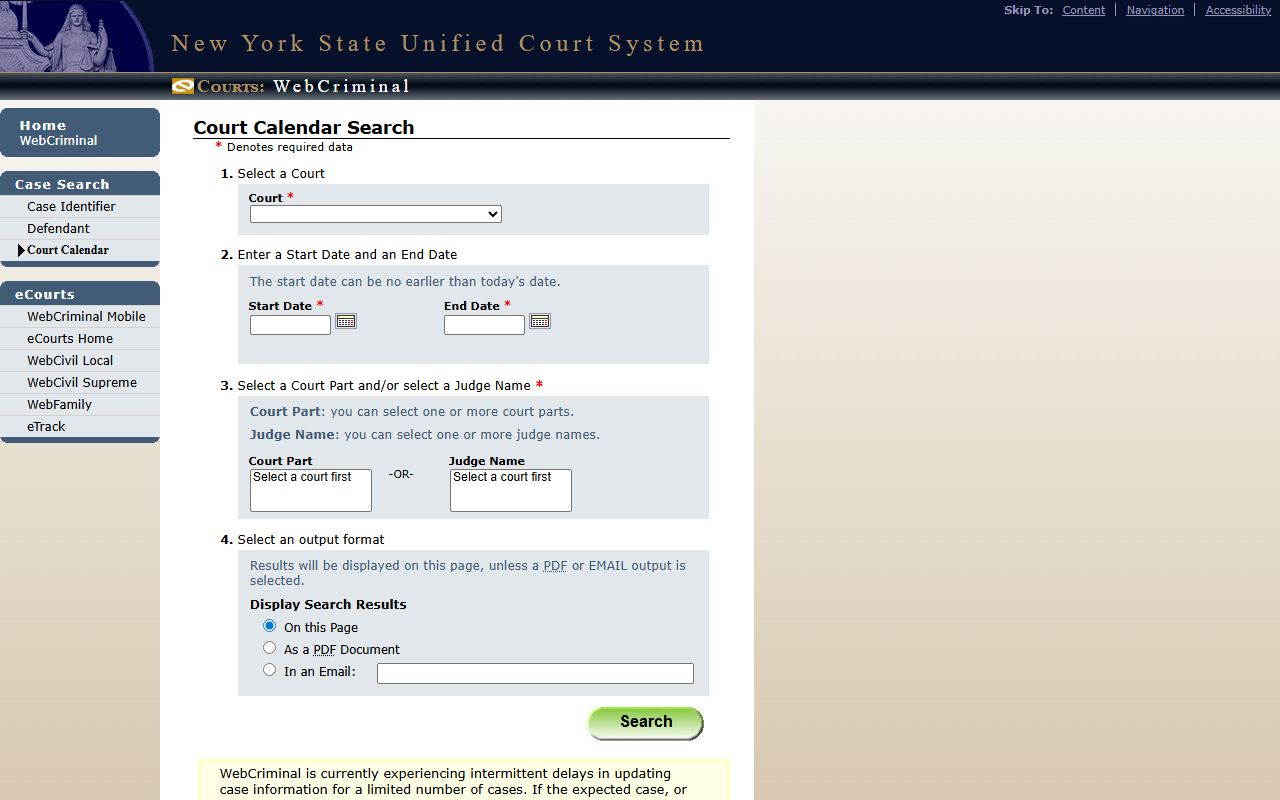
The calendar search has a few firm rules. You must select a court before you can pick a part or a judge. The start date can be no earlier than today, since the tool tracks future dates only. The field table breaks down the inputs.
| Field | Type | Required | Notes |
|---|---|---|---|
| Court | Dropdown | Yes | Includes Orange County Court, Orange Supreme, Middletown, Newburgh, and Port Jervis. |
| Start Date | Date | Yes | Can be no earlier than today's date. |
| End Date | Date | Yes | Sets the close of the calendar range. |
| Court Part | Multi-select | Conditional | Pick one or more parts after choosing a court. |
| Judge Name | Multi-select | Conditional | Pick one or more judges after choosing a court. |
| Output format | Radio | No | Show on page, build a PDF, or email with an address. |
The output choices are worth a note. You can read the results right on the page, build them as a PDF, or have them emailed to an address you enter. The PDF works well for a printed schedule, and the email option suits an attorney tracking many dates. The part and judge filters only open after you pick a court, so the order of the inputs matters. Pick the court, then the date range, then narrow by part or judge if a busy calendar needs it.
WebCriminal posts a standing notice that it has intermittent delays updating a limited number of cases. The delay hits only a small set of cases, not the whole system. Still, if an expected case or a detail is missing, the safe move is to wait and search again later rather than assume the case does not exist.
What an Orange County Docket Entry Shows
A docket entry is short, but it carries a lot. Each line ties a date to an event and the people involved. The exact labels shift between civil and criminal systems, yet the core fields stay much the same. The inventory below lists the fields you will read in a typical Orange County docket result.
| Field | What It Shows |
|---|---|
| Index / Case Number | The case ID; WebCivil uses an index number, WebCriminal a case or summons number. |
| Court | Orange Supreme, County, or a named City Court. |
| Parties | Plaintiff or petitioner, defendant or respondent, and other roles. |
| Appearance Date | The next or last calendar date for the matter. |
| Court Part | The courtroom unit assigned to the case. |
| Judge / Justice | The judge or justice hearing the matter. |
| Event / Entry Type | Motion, order, plea, adjournment, judgment, or notice. |
| Status | Open, active, restored, disposed, or future appearance. |
Sealed and restricted matters do not show full docket detail. For what each term means, the glossary on the court records page defines motion, disposition, part, and more.
City Court Calendars in Orange County
The three City Courts set their own calendars, and Middletown publishes a clear weekly schedule. Middletown City Court hears its civil calendar on Thursday at 9:30 a.m., landlord-tenant matters on Tuesday at 9:30 a.m., and traffic court on Thursday at 2:30 p.m. Newburgh City Court keeps separate fax lines for civil, traffic, and housing matters and for criminal matters. Each court has its own Chief Clerk who manages the daily docket.
Newburgh and Port Jervis publish their own calendars rather than route everything through one shared schedule. Newburgh, the busiest of the three, splits its work across separate fax lines for civil, traffic, and housing matters and for criminal matters, which signals how it sorts its dockets. Port Jervis runs a smaller calendar from its Hammond Street courthouse. Each City Court sets its own days and times for the different case types, so a Middletown traffic date will not match a Newburgh one.
City Court matters are not always in the statewide portals. For misdemeanors and traffic with a future date, WebCriminal may list the case, but small claims and housing schedules often live with the local clerk. When in doubt, call the court that issued the matter. The Orange County City Courts page lists each court's address and phone.
| Court | Address | Phone |
|---|---|---|
| Middletown City Court | 2 James Street, Middletown, NY 10940 | 845-476-3630 |
| Newburgh City Court | 300 Broadway, Newburgh, NY 12550 | 845-483-8100 |
| Port Jervis City Court | 20 Hammond Street, Port Jervis, NY 12771 | 845-476-3700 |
How to Find a Court Date in Orange County
Finding a court date takes a few quick steps once you know the court. The path below works for most criminal and civil matters. Gather the case number or the party name first, since both make the search faster.
- Decide the case type. Civil Supreme matters use WebCivil Supreme. Criminal matters with a future date use WebCriminal.
- Open the matching calendar tool. In WebCriminal, choose Court Calendar; in WebCivil, choose Court Calendars.
- Select the Orange County court, such as Orange County Court or a City Court.
- Set the date range. In WebCriminal the start date can be no earlier than today.
- Add a court part or a judge name to narrow a busy calendar, then run the search.
- If the date is missing, wait and search again, since WebCriminal warns of update delays. For City Court matters, call the court clerk.
For felony matters, the trial court side sits with the Orange County Supreme Court, which shares the Goshen courthouse with County Court. Online case data can lag, so confirm any date with the clerk before you rely on it.
When to Call the Clerk About a Docket
Online dockets cover a lot, but not everything. Call the clerk when a case is sealed, when it sits in Family Court, or when the portal shows no future date but you expect one. The Orange County Clerk handles Supreme and County Court papers at 255 Main Street in Goshen, phone 845-291-2690, with a Court Papers line at 845-291-3286. Each City Court has its own Chief Clerk for local dockets.
A missed court date can lead to a bench warrant or a default, so do not assume an online portal is fully current. If you think you missed an appearance, call the court or speak with a lawyer right away. For criminal docket help, the Orange County arrest records page covers how charges move through the courts.